
Repository doc ·
gemini/agents/genai-experience-concierge/langgraph-demo/backend/README.md· Open on GitHub · Part of Gemini Notebooks
LangGraph Agent Backend Server
This directory demonstrates how to build each of the agent design patterns and host them on a server. This is accomplished using the langgraph_server module to convert any LangGraph StateGraph object into a FastAPI router that implements a subset of the LangGraph Cloud API required to use the RemoteGraph protocol. This enables the usage of standard LangGraph clients to build agent apps, including graph visualization, streaming, async/sync invocation, and all of the powerful state management and time-travel features of LangGraph.
Getting Started
Environment Setup
Clone the repository and ensure that the Google Application Default Credentials are configured. You can do this by running the following commands:
# Clone repository and navigate to project root directory
git clone https://github.com/GoogleCloudPlatform/generative-ai.git
cd generative-ai/gemini/agents/genai-experience-concierge

# Set up Google Application Default Credentials
gcloud auth login
gcloud auth application-default login
(Optional) Create the Cymbal Retail dataset
The function calling demo agent requires a BigQuery dataset to exist to query a fictional retail dataset. This is automatically created during demo deployment, but must be manually created if the demo project doesn’t exist. To manually create these tables, you can run this command:
uv run --frozen concierge langgraph create-dataset --project-id $PROJECT_IDRun the server
To start the backend server, open a new terminal window, navigate to langgraph-demo/backend and run:
uv run --frozen uvicorn concierge.server:app --port 3000 --reloadAccess the Agent API endpoints
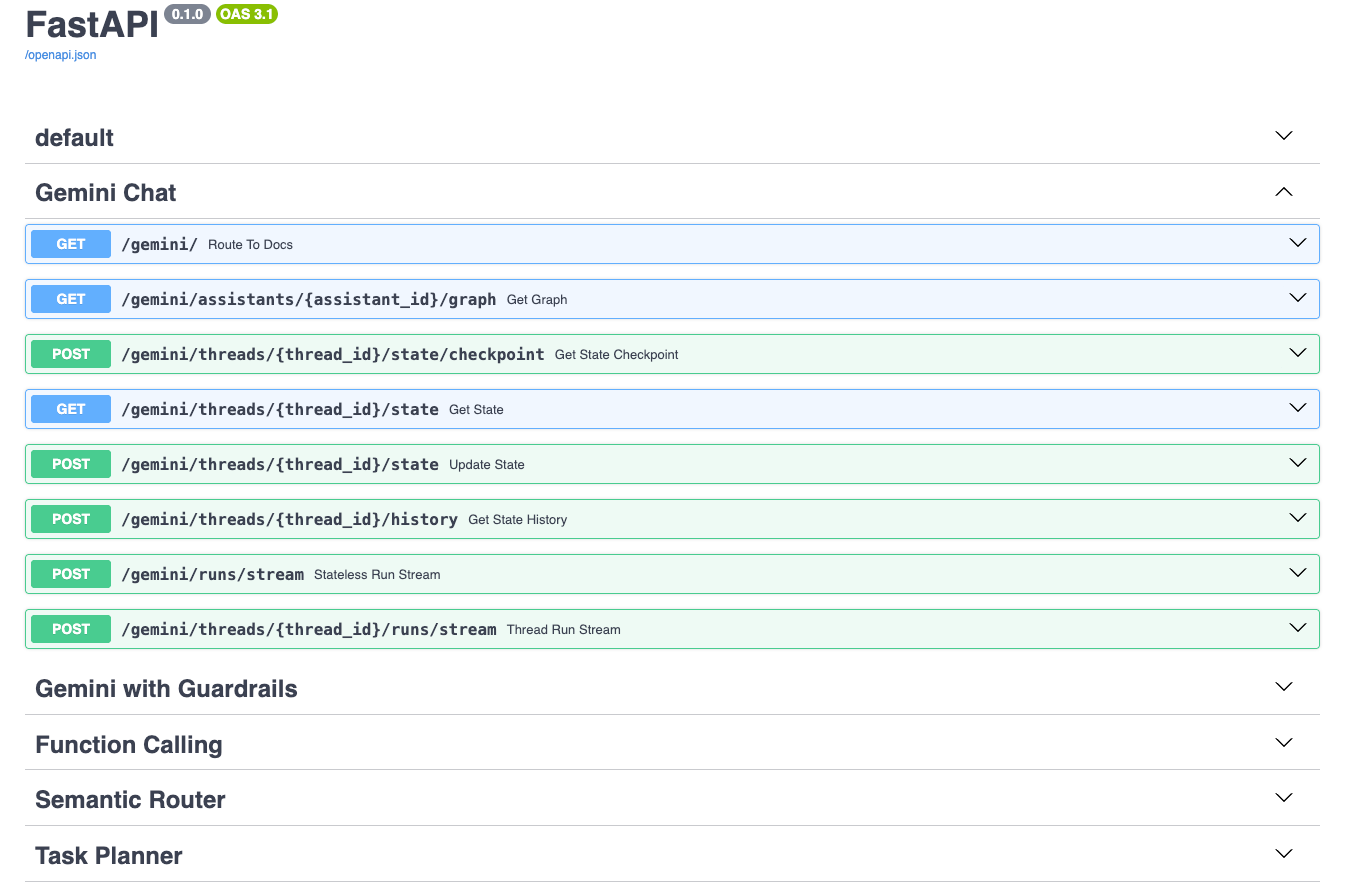
The auto-generated FastAPI documentation by will be available at /docs (Swagger) or /redoc (Redoc).
The server exposes the following API routes for interacting with the different agents:
/gemini: For interacting with the general-purpose Gemini chat agent./gemini-with-guardrails: For interacting with the Gemini chat agent with guardrails./function-calling: For interacting with the function calling agent./semantic-router: For interacting with the semantic router agent./task-planner: For interacting with the task planner agent.
Each agent’s route provides endpoints for invoking the agent, managing conversation state, and retrieving conversation history:
-
GET /assistants/{assistant_id}/graph: This route retrieves the graph structure associated with a specific assistant, identified by itsassistant_id(unused since each route only hosts one agent). This is used to draw a visualization of the graph. -
POST /threads/{thread_id}/state/checkpoint: This route is used to get a specific checkpoint of the state for a thread, identified by itsthread_id. The request body contains the checkpoint configuration. -
GET /threads/{thread_id}/state: This route retrieves the current state of a specific thread, identified by itsthread_id. -
POST /threads/{thread_id}/history: This route retrieves the history of state changes for a specific thread, identified by itsthread_id. -
POST /threads/{thread_id}/state: This route updates the state of a specific thread, identified by itsthread_id. -
POST /runs/stream: This route initiates a stateless run of an agent and streams the results. This can only be called if the agent is compiled without a checkpointer. -
POST /threads/{thread_id}/runs/stream: This route initiates a run within a specific thread, identified by itsthread_id, and streams the results. This can only be called if the agent is compiled with a checkpointer.
Key Features
-
Diverse Agent Implementations: The demo showcases several distinct agent design patterns (see Agent Design Patterns for more details):
- Gemini Chat: Source Code
- Purpose: A general-purpose conversational agent with a system prompt to take on the role of a Retail Assistant built with the Gemini language model. It handles basic user queries and maintains conversation context.
- Streams: Response text generated by Gemini.
- Gemini Chat with Guardrails: Source Code
- Purpose: An enhanced Retail Assistant agent that incorporates guardrails to ensure safe and appropriate responses. It classifies user inputs and blocks potentially harmful or out-of-scope requests.
- Streams: Guardrail classifications and response text.
- Function Calling: Source Code
- Purpose: This Retail Assistant agent demonstrates how to integrate function calling with LangGraph. It can use tools to retrieve real-time data (e.g. product information, stores, inventory) and incorporate the results into its responses.
- Streams: Function calls, function responses, and response text.
- Available tools:
find_products: Search for products based on various criteria (e.g., store, price, keywords).find_stores: Search for stores based on name, location, or products offered.find_inventory: Check the inventory of a specific product at a store.
- Semantic Router: Source Code
- Purpose: A useful component for multi-agent systems, this agent intelligently routes user queries to the most appropriate specialized agent (i.e. Retail Assistant or Customer Support Assistant) based on the query’s semantic content.
- Streams: Routing decision and response text.
- Task Planner: Source Code
- Purpose: This advanced multi-agent design can break down complex user requests into step-by-step plans, execute those plans (e.g., using search), and then reflect on the results to provide comprehensive responses.
- Streams: Generated plans, each executed task, plan reflection, and response text.
- Gemini Chat: Source Code
-
LangGraph for Agent Orchestration: LangGraph is used as the core framework for defining the interaction flows between agents. It enables the creation of robust, stateful, and multi-turn conversations.
-
FastAPI Integration: The project leverages FastAPI to expose the LangGraph agents as a set of REST API endpoints. This makes it easy to deploy and access the agents from other applications.
-
Modular Design: The source code isolates core functionality into tools, nodes, agents, and the langgraph_server. Maintaining this modular design is incredibly useful for building agents at a large scale. A single team might be building a large number of agents for many use cases so the separation between tools, nodes, agents, and server generation allows for reusable components and greater locality.
Each agent is built by composing multiple nodes (i.e. execution steps). All agents are built from a shared set of nodes (defined in concierge/nodes). For example, all agents use the
save-turnnode to finish processing a turn and reset the state to be ready for a new user input. The Gemini chat, guardrails, semantic router, and function calling agents all share thechatnode, but the guardrail and router agents add a classifier layer to conditionally route tochatorsave-turn. To ensure compatibility is satisfied, each node defines its runtime configuration requirements, input schema requirements, and other “build-time” parameters.Since there isn’t any dependency between the agent server and nodes, it’s possible to just directly build a LangGraph agent using the pre-built nodes. For example, we can recreate the Gemini agent like this:
from langgraph.checkpoint import memory from concierge import settings, utils from concierge.nodes import chat, save_turn from concierge.langgraph_server import langgraph_agent chat_node = chat.build_chat_node( node_name="chat", next_node="save-turn", system_prompt=""" You are an AI assistant for the Cymbal Retail company Answer questions about the company. Cymbal offers both online retail and physical stores and carries any safe and appropriate product you can think of. Feel free to make up information about this fictional company, this is just for the purposes of a demo. """.strip(), ) save_turn_node = save_turn.build_save_turn_node(node_name="save-turn") state_graph = utils.load_graph( schema=chat.ChatState, nodes=[chat_node, save_turn_node], entry_point=chat_node, ) # Standard LangGraph compilation step compiled_graph = state_graph.compile(checkpointer=memory.MemorySaver()) # Runtime configuration chat_config = chat.ChatConfig( project="...", region="us-central1", chat_model_name="gemini-3.5-flash", ) # Run an example streamed query async for chunk in compiled_graph.astream( input={ "current_turn": { "user_input": "Can you create an overview of each department and their top selling products?" } }, # Note that the agent_config is passed in addition to the standard thread ID configuration config={"configurable": {"thread_id": "test-thread", "chat_config": chat_config}}, stream_mode="custom", ): print(chunk["text"], end="") -
Checkpointing: The agent server can be configured to leverage LangGraph’s checkpointer implementations to persist session state with various backends: in-memory, SQLite, and Postgres.
LangGraph to FastAPI Conversion
The langgraph_server directory contains the essential components for converting LangGraph graphs into deployable FastAPI applications:
langgraph_agent.py: This file defines theLangGraphAgentclass, which wraps a LangGraphStateGraphand provides methods for interacting with it (e.g., getting graph structure, managing state, streaming execution). It acts as an adapter between LangGraph’s logic and the server.fastapi_app.py: This file contains thebuild_agent_routerfunction, which takes aLangGraphAgentand a FastAPIAPIRouterand sets up the API endpoints for interacting with the agent. It handles request processing, serialization, and streaming responses using FastAPI.schemas.py: Defines the Pydantic models used for request and response data, ensuring data validation and type safety in the API.checkpoint_saver.py: Provides functions for loading, setting up, and cleaning up different checkpointing backends, allowing the server to manage conversation state persistence.
Interactive Jupyter Notebooks 📓
Some development notebooks are provided to interactively test both the local implementation of the agents and deployed agents.
- notebooks/langgraph-agent.ipynb: Build and compile a simple LangGraph graph, wrap it in a
LangGraphAgentrunning locally within the notebook, display the graph visualization, and run some simple tests. - notebooks/langgraph-remote-agent.ipynb: Query a remote instance of the “Gemini Chat” example agent server (either at localhost or a deployed endpoint). Display a visualization of the remote graph and run some simple tests.