
Repository doc ·
gemini/multimodal-live-api/native-audio-websocket-demo-apps/realtime-advisor-demo-app/README.md· Open on GitHub · Part of Gemini Notebooks
Real-time Advisor Demo
| Author |
|---|
| Zack Akil |
A specialized React application demonstrating how to build a real-time AI advisor using Gemini Live API. This demo showcases advanced features like proactive audio, function calling, and precise interruption control.
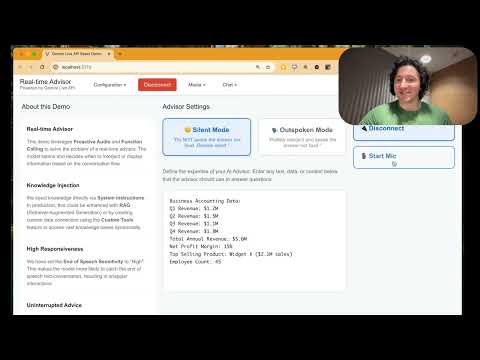
Overview
This application simulates a business advisor that listens to a conversation and provides relevant insights based on a provided knowledge base. It demonstrates two distinct interaction modes:
- Silent Mode: The advisor listens and pushes visual information (via a modal) without speaking, perfect for unobtrusive assistance.
- Outspoken Mode: The advisor politely interjects into the conversation to offer advice verbally, while also showing the visual data.
Key Features
- Dual Interaction Modes: Toggle between “Silent” (visual only) and “Outspoken” (audio + visual) behavior using System Instructions.
- Knowledge Injection: Dynamically injects business data (revenue, employee counts, etc.) into the model’s context via the UI.
- Barge-in Control: Demonstrates the
activity_handlingconfiguration to prevent the user from accidentally interrupting the advisor’s response. - Tool Use: Uses a custom
show_modaltool to display structured information to the user.
Quick Start
1. Backend Setup
The Python backend handles authentication with Google Cloud.
# Install dependencies
pip install -r requirements.txt

# Authenticate with Google Cloud
gcloud auth application-default login

# Start the proxy server
python server.py
2. Frontend Setup
In a new terminal, start the React application:
Ensure you have Node.js and npm installed. If not, download and install them from nodejs.org.
# Install Node modules
npm install

# Start development server
npm run dev
Open http://localhost:5173 to view the app.
Configuration
- Project ID: Enter your Google Cloud Project ID in the “Configuration” dropdown.
- Proxy URL: Defaults to
ws://localhost:8080. - Knowledge Base: Edit the text in the center column to change what the advisor knows.
Project Structure
/
├── server.py           # WebSocket proxy & auth handler
├── src/
│   ├── App.jsx              # Main layout and Advisor logic
│   ├── components/
│   │   └── LiveAPIDemo.jsx  # Core Gemini API integration
│   ├── utils/
│   │   ├── gemini-api.js    # Gemini WebSocket client
│   │   └── media-utils.js   # Audio/Video processing
└── public/
    └── audio-processors/    # Audio worklets